ReloPortal Redesign
Phase 1: Scope and Research
ReloPortal Redesign
Phase 1: Scope and Research
ReloPortal Redesign
Phase 1: Scope and Research
Ping | Enterprise Configuration & Deployment Platform
An enterprise configuration interface that translates complex system processes into clear deployment workflows
and operational visibility across SaaS environments.
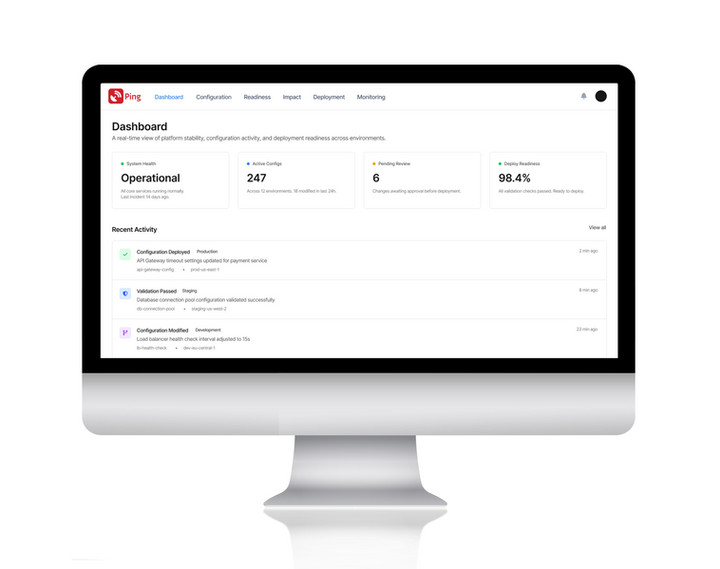
Enabling teams to move from fragmented setup processes toward clearer operational readiness.
Senior Product Designer | Enterprise Saas & Operational Infrastructure | Platform: Web
Project Overview
Before this platform, operators managed configuration changes across fragmented tools with limited visibility into system state, dependencies, or deployment risk. Led the design of an enterprise configuration platform that translated system complexity into interpretable deployment workflows — enabling operators to manage configuration and deploy with operational clarity.

The dashboard provides a real-time operational snapshot across configuration activity,
deployment readiness, and system health.
The UI prioritizes signal over noise, allowing teams to quickly assess status, identify blockers,
and understand what requires attention before proceeding.
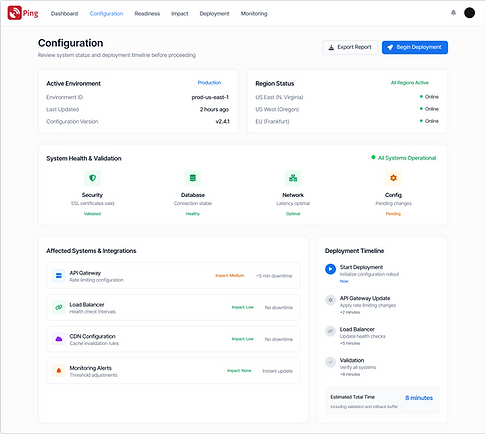

Configuration screens were designed to reduce cognitive load while handling complex system parameters.
Clear hierarchy, validation states, and inline feedback help teams make changes confidently without introducing downstream risk.

Impact Assessment helps teams understand the operational and business consequences of deploying changes.
Configuration summaries, impacted services, and rollback readiness are presented together so risk is communicated in practical terms.
This screen bridges technical validation and human decision-making by translating system changes into expected outcomes,
disruption levels, and recovery posture.

Deployment represents the highest-risk moment in the workflow.
The deployment UI emphasizes confirmation, rollback readiness, and transparent sequencing
so teams understand exactly what will happen, when it will happen, and how failures are handled.

Post-deployment monitoring provides continuous visibility into system performance and alerts.
By separating execution from monitoring, the UI reinforces trust, teams can deploy confidently knowing safeguards and visibility are always active.