ReloPortal Redesign
Phase 1: Scope and Research
ReloPortal Redesign
Phase 1: Scope and Research
ReloPortal Redesign
Phase 1: Scope and Research
Ping | Enterprise Configuration & Deployment Platform
Designed an enterprise deployment platform that simplified configuration, validation,
and operational decision making across distributed systems.

Providing operators with a unified view of configuration health, deployment readiness, and system status.
Senior UX Designer | Enterprise SaaS & Operational Infrastructure
Platforms: Web, Internal Tools, B2B SaaS
Overview
Enterprise deployment workflows relied on fragmented validation processes, disconnected configuration tools,
and limited visibility into system readiness. The platform unified deployment signals into structured workflows that simplified validation,
improved operational clarity, and reduced deployment risk.
Role & Leadership
Led product design across enterprise deployment workflows, partnering with Product and Engineering to define validation models,
dependency visualization, and operator decision flows that improved deployment confidence across distributed systems.
The Challenge
System teams lacked visibility into how configuration changes impacted dependent systems, creating risk during deployment.
Information was fragmented across tools, making it difficult to evaluate system state, identify potential failures, and make informed decisions.
The challenge was not just managing configuration, but enabling safe, confident decision-making within complex, interconnected environments.
Strategy
Designed a decision framework that surfaced validation results, dependency health, and operational risk,
allowing teams to evaluate deployment readiness before changes reached production.
System Architecture & Deployment Flow
Mapping how configuration flows through validation, dependency checks, and deployment systems,
highlighting key system interactions and decision points across the workflow.
System & Workflow Design
Configuration, validation, dependency analysis, and deployment actions were connected into a continuous operational workflow. Rather than navigating multiple tools, operators could monitor system state, identify issues, and take action within a single experience.
Design & Execution
Complex infrastructure behavior was translated into clear interfaces that highlighted system health, dependencies,
and recommended actions. Each screen supported confident operational decisions by making deployment risk visible before execution.
Operator Workflow & Decision Layer
Interfaces designed to guide users through system states, validation feedback, and deployment decisions.
Outcome
The system improved workflow clarity, simplified infrastructure management,
and created more consistent deployment processes across enterprise operational teams.
System Health & Observability
Real-time monitoring brought together deployment health, infrastructure signals, and operational alerts into a unified observability layer.
Teams could identify issues earlier, understand system health faster, and respond with greater confidence.
Key Takeaways
This work demonstrated how enterprise infrastructure can be simplified through thoughtful information architecture and workflow design.
By connecting validation, dependencies, deployment actions, and observability into one experience,
the platform helped operators reduce risk, improve confidence, and make faster operational decisions.

Mapping deployment workflows across validation, dependencies,
and execution created a shared operational model for decision making.

Operators could understand deployment impact, evaluate risk,
and choose the appropriate action from a single decision workspace.
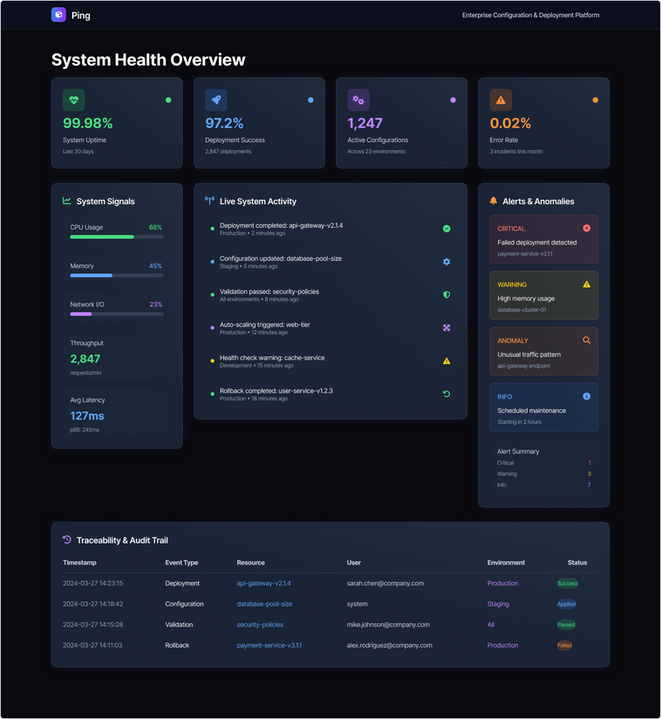
A unified operational dashboard combined deployment health, live activity, alerts,
and audit history into a single monitoring experience.